Our Release Process Was a USB Stick in a Laptop
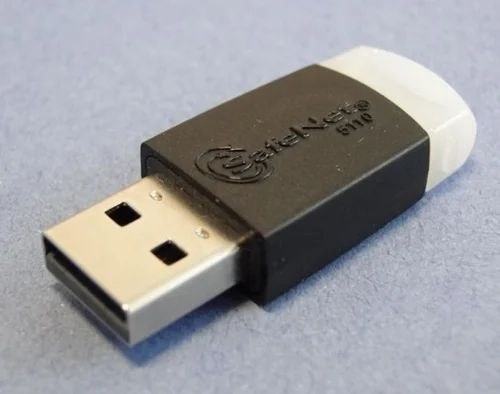
For two years every release of our Windows desktop app went through one laptop. Trucking Hub is our SaaS for trucking companies, and next to the web app it ships a desktop app (Windows and MacOS). We signed these apps with a Sectigo EV certificate on a SafeNet USB hardware token, which we needed to buy every year and to be shipped. The private key on a token cannot be exported, so signing happens on whichever machine the token is plugged into, and that machine was one laptop. It cost $500 a year, every renewal was painful.
The Mac build had the same problem, just in a different form. Signing and notarizing a macOS app only works on macOS, so those releases ran on a Mac, with the Developer ID certificate in its Keychain.
So, only one person could ship a release, and only when the Laptop and Mac was available.
In September 2026 we moved signing to Azure Artifact Signing and the build to an Azure DevOps pipeline. Any developer on the team can now ship a Windows or macOS release with one manual trigger, and a Windows release takes 10 to 12 minutes from npm ci to the update feed.
Contents
- What Artifact Signing is
- What Squirrel does when it signs
- What Squirrel does not check
- The dlib and its metadata file
- The Azure side, briefly
- The pipeline
- The same thing on GitHub Actions
- The Mac half
- Things that will bite you
- What we kept
- Update: the feed moved off S3 (September 24)
- Results
What Artifact Signing is
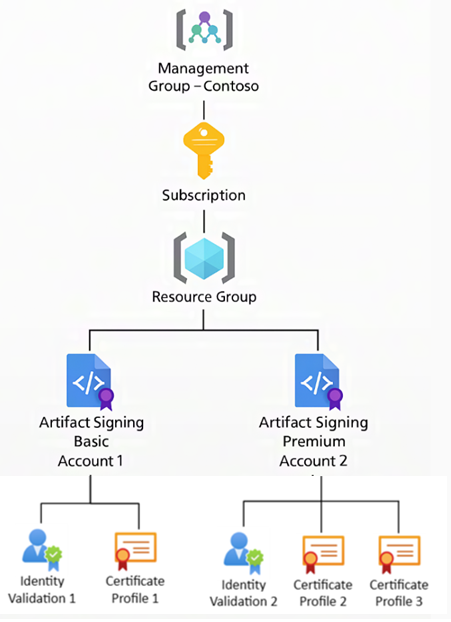
Azure Artifact Signing is Microsoft’s managed code-signing service. It ran in preview as Trusted Signing, was renamed, and reached general availability in January 2026. You create a signing account in an Azure region, Microsoft validates your legal entity, and while that validation stands the service issues certificates in your company’s name on demand. Each certificate is valid for 72 hours, the private key stays inside the service (FIPS 140-3 Level 3), and you never download a certificate or a PFX. Signatures outlive the certificates because they are timestamped. The subject on the signed binary is your validated legal name, but the chain above it is Microsoft’s rather than your old CA’s, and what SmartScreen makes of that is covered in Results. It is not an EV certificate, and the service does not issue those.
You sign with tools you already have. signtool takes a /dlib plug-in that talks to the service, dotnet sign supports it directly, and there are GitHub Actions and Azure DevOps tasks. Every signing call goes to the endpoint of the region the account lives in, so the region is part of every configuration file.
Basic costs $9.99 a month for 5,000 signatures and Premium $99.99 for 100,000, on a paid subscription only. Public Trust profiles, the kind SmartScreen accepts, are available to organizations in the United States, Canada, the EU, the UK, Australia, New Zealand, Japan, South Korea, Singapore, Switzerland, Norway and Israel, and to individual developers in the United States and Canada. Private Trust profiles are for internal distribution and do nothing for SmartScreen.
The other cloud route is a bought certificate imported into Azure Key Vault. It keeps the yearly purchase and the renewal, which were the two things we wanted gone.
The Azure setup and the single dotnet sign call for a .NET app are well documented. Ours was a different shape of problem, an Electron app packaged by Squirrel, built on Azure DevOps, with an auto-update feed, then on Amazon S3, that has to keep working for everyone who already has the app.
What Squirrel does when it signs
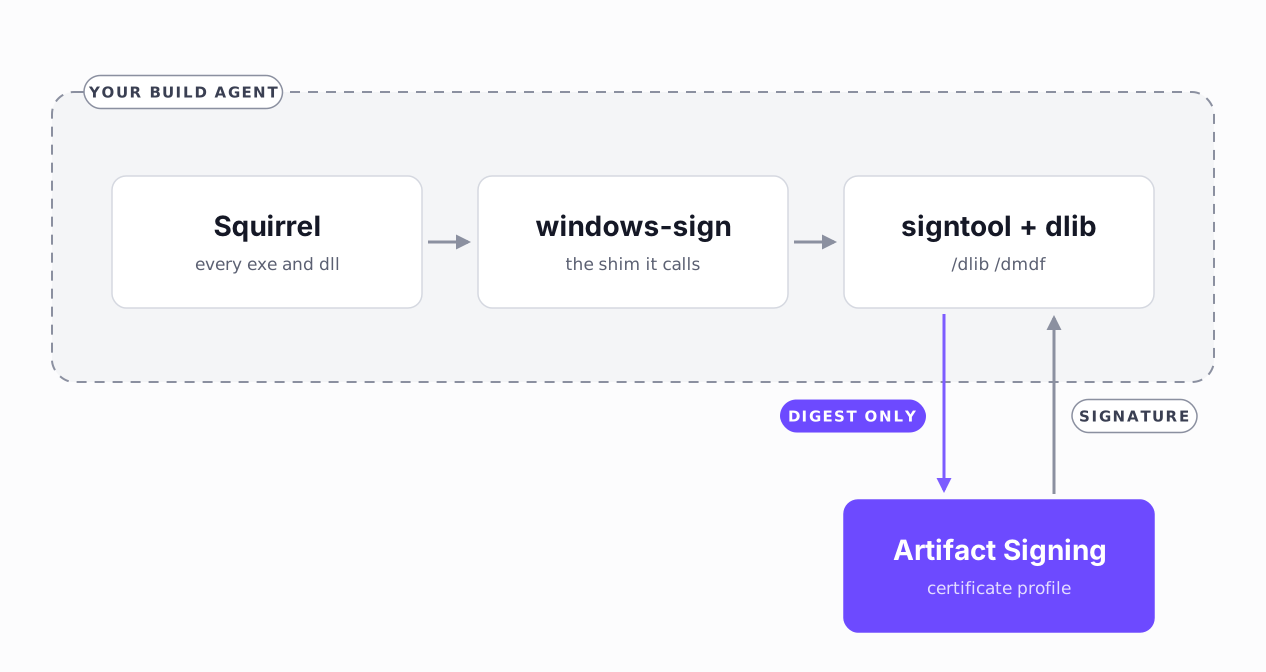
Electron Forge’s Squirrel maker (electron-winstaller) signs every .exe and .dll inside the nupkg plus Setup.exe, about ten files per release. It does that with its own vendored signtool.exe, which dates from 2009 and cannot load a /dlib. Out of the box Squirrel cannot use the service at all.
electron-winstaller 5.3.0 added a windowsSign option that fixes this. When you set it, winstaller swaps its vendored signtool for a small Node single-executable shim. Squirrel calls the shim as if it were signtool, the shim forwards the call to @electron/windows-sign, and windows-sign runs the signtool you point it to. When the make finishes, winstaller puts the original signtool back. The shim needs Node 20 or newer. We run electron-winstaller 5.4.0 with @electron/windows-sign 1.2.2, and the details in this section are about those versions; windows-sign 2.x requires Node 22.12, is ESM-only, and has fixed some of what follows.
The maker config we ended up with in forge.config.ts:
new MakerSquirrel({
  // name, setupExe, remoteReleases as before
  windowsSign: {
    signToolPath: resolveSignTool(),   // Windows SDK signtool 10.0.22621.755 or newer
    timestampServer: 'http://timestamp.acs.microsoft.com',
    hashes: ['sha256'],
    signWithParams: ['/dlib', dlibPath, '/dmdf', metadataPath],
  },
})
Four details cost us time:
- winstaller picks its signing method by truthiness, in a fixed order:
signWithParams, thencertificateFilewithcertificatePassword, thenwindowsSign. If anything leaves a truthysignWithParamson the maker config, thewindowsSignhook is never reached, and nothing tells you. The build signs with the old method and goes green. The fix is to leave the key off the maker config entirely, not to set it to a falsy value. Our config returns one shape in token mode and another in Azure mode for exactly this reason. - windows-sign 1.x adds
/fd,/trand/tdon its own. Put them insignWithParamsas well and signtool gets them twice. 2.0.6 dedupes them. - The default
hashesis sha1 plus sha256, which means two signatures and two signing calls per file. Set it to sha256 only. - Leave
automaticallySelectCertificateunset. It adds/a, which makes no sense when the certificate comes from a dlib.
The signtool bundled with windows-sign 1.2.2 is 10.0.22000 and cannot load the dlib, and neither can the one in older SDKs. Point signToolPath at Windows SDK 10.0.22621.755 or newer, or set WINDOWS_SIGNTOOL_PATH. windows-sign 2.1.0 bundles 10.0.26100, which is past that bar.
What Squirrel does not check
The question I could not find answered anywhere was whether a new certificate chain breaks auto-update for the installed base. Every client has Update.exe next to the app, which is Squirrel’s vendored Squirrel.exe under another name. If it compared the signer of a downloaded package with the signer of the running one, the first Artifact Signing release would strand every user on 1.8.1.
I needed to decode the IL of Squirrel.exe to find out. AuthenticodeTools.IsTrusted has exactly one caller, and it is build-time logic that skips a file which is already signed. CheckForUpdate, DownloadReleases, ApplyReleases and UpdateSelf never call it. Client-side integrity is the SHA1 and the size from the RELEASES file, plus the per-file checksums inside a delta package. Who signed the binaries is not part of it.
The signature still matters, for SmartScreen on a downloaded Setup.exe and for anyone who looks, which is why the pipeline verifies every file. We had seen this in the field before I read the IL. An earlier release had already crossed a certificate change, after the EV renewal, and updates went through. I wanted to know why.
The dlib and its metadata file
The dlib is Azure.CodeSigning.Dlib.dll from the Microsoft.ArtifactSigning.Client NuGet package. We do not commit it (15 MB of DLLs). A PowerShell script downloads the .nupkg from the NuGet flat container URL, unzips it into a git-ignored tools/ folder, and checks the three things the dlib needs to load: the .NET 8 x64 runtime, the VC++ 2015-2022 x64 redistributable, and a signtool new enough to take /dlib. If one is missing the script names it and exits non-zero. Without that check signtool fails with No certificates were found that met all the given criteria, which says nothing about the cause.
The metadata file is committed. It holds no secrets:
{
  "Endpoint": "https://<region>.codesigning.azure.net",
  "CodeSigningAccountName": "<account>",
  "CertificateProfileName": "<profile>",
  "ExcludeCredentials": [
    "ManagedIdentityCredential",
    "WorkloadIdentityCredential",
    "SharedTokenCacheCredential",
    "VisualStudioCredential",
    "VisualStudioCodeCredential",
    "AzurePowerShellCredential",
    "AzureDeveloperCliCredential",
    "InteractiveBrowserCredential"
  ]
}
The ExcludeCredentials list is the authentication design. The dlib uses DefaultAzureCredential, which walks a chain of credential sources in order. We exclude everything except EnvironmentCredential and AzureCliCredential. On a laptop that means az login and nothing else. In the pipeline it means the service connection behind the AzureCLI@2 task. No client secret lives in the repo or in a variable group.
The Azure side, briefly
Microsoft’s quickstart covers what you need to do on the portal side. Four things about our setup:
- We created the account with the
az artifact-signingCLI extension instead of the portal and kept the commands in a script, because the azurerm provider version our Terraform stack pins has no resource for the service yet. - Two roles matter. The person who submits identity validation needs Artifact Signing Identity Verifier. Everything that signs, the pipeline’s service principal and each developer who signs locally, needs Artifact Signing Certificate Profile Signer on the account.
- Identity validation is a validation of the legal entity: registration documents, a DUNS number, an address that matches what Dun & Bradstreet has on file, and a person with government ID who verifies themselves through Microsoft Authenticator on behalf of the company. Microsoft says 1 to 20 business days. Ours took four. Start it first.
- The Public Trust certificate profile can only be created after validation completes, and the subject comes out of the validation, not out of what you submitted.
CN=<your legal name>is not something you type, and neither is the city. Microsoft normalised ours, so the subject on every signed binary names a different town than the one on the application. Harmless, and alarming the first time you see it.
The pipeline
Signing was the blocker, but the pipeline is what changed who can release.
It is manual only. It takes a branch, a platform, a publish boolean that defaults to false, so an accidental run produces an artifact and nothing else, and a recover parameter for the one failure mode described below.
The Windows job runs on a hosted windows-2022 agent, which already has the Windows SDK signtool, the .NET 8 runtime and the VC++ redistributable. Steps, in order:
- Check out the app repo,
npm ci. - Run
setup-artifact-signing.ps1from the dlib section: download the dlib, check the prerequisites. - Version guard. Read
versionfrompackage.jsonand the newest version in the feed’sRELEASESfile, and fail if the package version is not greater. Squirrel builds the delta package against the latest published full package, so building a version that already exists on the feed fails much later withbase package release does not exist. We learned that the slow way. - Build and sign inside a single
AzureCLI@2task, shown below. Whenpublishis true it runselectron-forge publish --dry-run, which does the full make and writes the publish metadata to disk without uploading anything; otherwise a plain make. - Verify the signatures.
check-desktop-signatures.ps1runsGet-AuthenticodeSignatureonSetup.exeand on every.exe,.dlland.nodeinside the new full nupkg. Each must beValid, signed by our publisher name, and timestamped. Anything else fails the build. - Publish the make output and the dry-run metadata as a pipeline artifact. Always, and before any upload, so the verified files survive a failed upload and can be uploaded again.
- Only when
publishis true:electron-forge publish --from-dry-runto the feed on blob storage and to the S3 mirror, then the blob upload for the website download.--from-dry-runuploads the files that were verified in step 5, not a rebuild.
Step 4 is the only step that touches the signing service, and this is all of it:
- task: AzureCLI@2
  displayName: Build and sign
  inputs:
    azureSubscription: <service connection>
    scriptType: pscore
    scriptLocation: inlineScript
    inlineScript: |
      $ErrorActionPreference = 'Stop'
      az account get-access-token --scope https://codesigning.azure.net/.default --output none
      if ($LASTEXITCODE -ne 0) { throw "Could not get an Artifact Signing token" }
      if ('${{ parameters.publish }}' -eq 'True') {
        npx electron-forge publish --dry-run   # full make and sign, nothing uploaded
      } else {
        npm run electron-make
      }
      if ($LASTEXITCODE -ne 0) { throw "electron-forge exited with $LASTEXITCODE" }
  env:
    WINDOWS_SIGN_MODE: azure
The task logs in to a task-scoped AZURE_CONFIG_DIR that child processes inherit, so npm, node, signtool, the dlib and the az it calls all see the login. Split the build across two tasks and the second one has no login.
The get-access-token line asks for a signing token before the build starts. Our service connection still uses a client secret, so today that line changes nothing. With workload identity federation, the token Azure DevOps hands to the task is valid for ten minutes, and a build that first asks for a signing token after that fails with AADSTS700024. Requesting it up front caches it for the hour the build needs. A build longer than that needs a managed identity behind the federation, whose tokens last around 24 hours.
The order matters. The two upload steps are the last two, so nothing that fails earlier can reach the feed, and with publish false they are not in the run at all. They sit behind a ${{ if }} template expression, so the expanded YAML has no reference to the storage credentials. This stopped being theory on release day, when the macOS dmg build failed halfway through. Both upload steps were skipped, and the feed was byte-identical to the backup taken before the release.
The deployment job targets an Azure DevOps environment with the Exclusive lock check, and the stage sets lockBehavior: sequential. The lock stops two runs from overlapping. sequential makes them queue; the default, runLatest, cancels the older waiting runs and lets only the newest through. With both, the version guard and the upload always see a consistent feed.
A failed upload is fixed by uploading again, never by rebuilding. The S3 publisher uploads RELEASES, Setup.exe and the two nupkg files in parallel, so a failure can leave RELEASES pointing at a package that is not there, or S3 complete and the blob upload failed. Clients cope with that. Squirrel checks the package hash before applying an update, so they see a failed update check and retry on the next interval. The fix is a run with recover set to the id of the failed run. It downloads that run’s artifact into the same path, checks that every file the dry-run metadata lists is there, and executes only the upload steps, so what reaches the feed is what was verified. A rebuild would not work anyway. Once the new version is on the feed, Squirrel finds no older package to build the delta from and fails with the error from step 3.
Recovery had a hole, and it took someone reading this post to find it. The version guard is compiled out of a recovery run, so the artifact’s RELEASES went up verbatim. Recover a run from before a later release went out, and the feed rolls back to the older version. The exclusive lock does nothing about that; it stops runs from overlapping, which is a different problem. Both jobs now read the version out of the recovered artifact, compare it against what is live, and refuse when the feed is already newer. Equal versions still pass, because that is the partial-upload repair recovery exists for.
The version guard in step 3 nearly lied to us. S3 serves RELEASES as application/octet-stream, and for that content type PowerShell 7’s Invoke-WebRequest returns .Content as a byte[], not a string. Splitting a byte array into lines gives you stringified byte values, the version regex matches none of them, and the guard reported “newest published: 0.0.0” and passed. Every version is greater than 0.0.0, so it would have waved through a version that was already on the feed. It only surfaced because I ran the guard by hand against the real feed instead of trusting a green step.
The same class of bug then hit the recovery check twice. First it filtered the downloaded artifact for *.json when Forge writes its dry-run state as *.forge.publish. Then the fix loaded that file with require(), which treats an unknown extension as JavaScript and throws. Both times the check printed success. The rule we took from it is that any validation step that can legitimately find zero items needs an explicit found-nothing failure.
The same thing on GitHub Actions
Our pipeline is on Azure DevOps because the rest of our CD lives there. Nothing above depends on it. On GitHub Actions, authentication is azure/login with OpenID Connect: a federated credential on an Entra app registration trusts your repository, the workflow asks for id-token: write, and the login step takes only the client id, tenant id and subscription id. There is no client secret at all. The service principal needs Certificate Profile Signer on the signing account, the same role as before. azure/login logs in for the whole job, so build, signing and verification can be separate steps and the dlib still finds the login through AzureCliCredential. The assertion GitHub hands to Azure is short-lived too, so the up-front token request from step 4 goes right after the login. The hosted windows-2025 runner has what the dlib needs: Windows SDK 10.0.26100 for signtool, the .NET 8 runtime, the VC++ 2022 redistributable and the Azure CLI.
The parts that differ from the pipeline:
permissions:
  id-token: write
  contents: read

concurrency:
  group: desktop-release
  cancel-in-progress: false
  queue: max

jobs:
  windows:
    runs-on: windows-2025
    environment: desktop-production
    steps:
      # checkout, setup-node 20, npm ci, setup-artifact-signing.ps1, version guard
      - uses: azure/login@v2
        with:
          client-id: ${{ secrets.AZURE_CLIENT_ID }}
          tenant-id: ${{ secrets.AZURE_TENANT_ID }}
          subscription-id: ${{ secrets.AZURE_SUBSCRIPTION_ID }}
      - run: az account get-access-token --scope https://codesigning.azure.net/.default --output none
      # dry-run make with WINDOWS_SIGN_MODE=azure, signature check, upload-artifact
      - if: ${{ inputs.publish }}    # a workflow_dispatch boolean, default false
        run: npx electron-forge publish --from-dry-run
The steps hidden in the comments are the pipeline’s steps 1 to 6, in the same order. The concurrency block is the Exclusive lock, and queue: max is the lockBehavior: sequential. cancel-in-progress: false on its own keeps only one run waiting; a third replaces the second. A GitHub environment with required reviewers adds the approval gate. Recovery is the same idea as in the pipeline, a second workflow that downloads the failed run’s artifact and runs only the upload steps, and it needs the same check that the feed is not already newer. The S3 keys and the blob storage connection string are the only secrets left.
If your files can be signed after the build, Microsoft’s azure/artifact-signing-action wraps the same signtool and dlib and picks up the azure/login session by default. For Squirrel it does not help, because the files it would sign are already inside the nupkg by the time the make finishes. The windowsSign hook is what gets you inside.
The Mac half
On Windows we changed how we sign, but on macOS we changed where. Artifact Signing does not sign macOS binaries, so the Mac job uses the same Developer ID certificate, the same notarytool and the same makers as before, on a hosted macos-15 agent instead of my Mac.
Export the Developer ID certificate from Keychain Access as a .p12, upload it to Azure DevOps Secure Files, and InstallAppleCertificate@2 puts it in a temporary keychain that is deleted when the job ends. The export is the step that goes wrong. A Keychain export without the private key looks the same as one with it and cannot sign anything, so check that the file holds a key before uploading it. Grepping the ASN.1 dump for pkcs8ShroudedKeyBag is not that check, since a keyBag is another way to store the key; openssl pkcs12 -in cert.p12 -nocerts -nodes prints the key if there is one.
Verification mirrors the Windows signature check and runs before any upload: codesign --verify --deep --strict on the app, then syspolicy_check distribution, then xcrun stapler validate. syspolicy_check is Apple’s own pre-distribution check, and it reports notarization and stapling problems that spctl does not.
One Mac in the field sat on an old version for months, and its ShipIt log said why. Months earlier an update had been rejected with SQRLCodeSignatureErrorDomain -1 and NSOSStatusErrorDomain -67061, “invalid signature (code or signature have been modified)”, on chrome_crashpad_handler, a helper nested inside Electron Framework.framework. We could not reproduce it. The same archive installed cleanly later, which says the archive on the feed is fine and nothing more; a corrupt download fits, and so does something we have not found.
Electron’s updater raises an error event for it, and update-electron-app, which we use with its defaults, only logs it. So nothing told the user, nothing told us, and the app stayed where it was. Nobody files a bug for an update that does not happen. ShipIt also validates far more strictly than launching does, so an app that runs fine when opened by hand can still be refused as an update.
So we checked the published archive rather than trusting it. The update zip has to preserve nested code signatures. cross-zip, which maker-zip uses, runs zip -r -y, and -y stores symlinks as symlinks, which keeps Framework/Versions/Current intact. We compared the published 1.9.0 archive with a known-good older one: identical structure, 273 entries, 14 symlinks, 9 _CodeSignature directories, no corruption.
Our Mac feed uses full zips, so Squirrel.Mac replaces the whole bundle every time and a jump across several versions is the same operation as a jump across one; our Macs in the field went from 1.5.0 straight to 1.9.0. The feed is a RELEASES.json with a currentRelease field, a different format from the Windows RELEASES file.
The dmg is unsigned and unnotarized. Apple’s guidance is to sign anything signable and notarize the outermost thing you ship. So far it has cost us nothing we can see. Gatekeeper evaluates the app inside, which is signed, notarized and stapled. The dmg we shipped before the pipeline was equally unsigned, and a Safari download of the new one opens to the drag-to-Applications window with no warning. spctl on the dmg does report “rejected / no usable signature”, which describes the container. spctl on the app itself, from a quarantined Safari download, reports accepted and source=Notarized Developer ID.
The one hosted-agent problem was the dmg maker, and it is what failed halfway on release day. appdmg intermittently dies on hdiutil detach, because it only retries the “Resource busy” exit code and the failure we get is a different one. We wrapped the maker in a retry. Signing and notarization happen during package, before any maker runs, so the retry only redoes the disk image.
Things that will bite you
- The timestamp server. With 72-hour certificates the timestamp is what keeps a signature alive.
timestamp.acs.microsoft.comis the one Microsoft documents, and Microsoft’s FAQ has an entry on how to check whether it is healthy, which tells you something. Any RFC 3161 server works with these signatures;timestamp.digicert.comis the usual fallback. Microsoft’s did not fail on us across the first five pipeline runs. That is five runs, not a track record. - 403 has six causes. Wrong region in the endpoint, a missing Certificate Profile Signer role, identity validation not completed, a typo in the account or profile name, a dlib that did not load, or a firewall. The signature check in the pipeline turns a silent signtool failure into a red build.
az loginon Windows. It goes through the Web Account Manager broker by default, and that sign-in is unreliable for some people.az config set core.enable_broker_on_windows=falseoraz login --use-device-codegets you a plain browser or device-code login. Visual Studio’s cached credentials can also get picked up by the dlib; theExcludeCredentialslist above is what keeps them out.- Node sizes its heap from the machine. The default old-space limit depends on how much RAM the system has, so the Vite renderer build that fits comfortably on a developer laptop dies on a hosted agent at about 2 GB with
Reached heap limit Allocation failed.NODE_OPTIONS=--max-old-space-size=4096on the build step. Works on my machine, with a mechanical explanation for once. - The windows-sign log.
@electron/windows-signwriteselectron-windows-sign.loginto the working directory with the full options it received. If you keep a token mode as a fallback, that log contains the token password. Git-ignore it. - Identity validation expires. Certificates renew themselves. The validation does not, and ours runs out in 2028. Microsoft emails 60 days ahead, renewal is a full re-validation of the company, 1 to 20 business days again, and when it lapses signing stops with 403. After renewal the certificate profile has to be deleted and recreated with the same name against the new validation. Neither the CLI extension nor the REST API exposes identity validations, so there is nothing to script and nothing to monitor. Put the date in the team calendar with a 90-day reminder and more than one owner. This is the one thing that can put you back where the expired EV certificate did.
makeempties its output folder first. The Squirrel maker deletesout/make/squirrel.windows/x64before it builds, so a local make on a machine that still holds release artifacts destroys them. The pipeline artifact is the copy that matters.
What we kept
The USB token stays in the drawer as a fallback until the Sectigo certificate expires in November 2027. WINDOWS_SIGN_MODE=token switches forge.config.ts back to the old signWithParams path. Once a few cloud-signed releases have gone out cleanly we will delete that mode and the .cer with it.
Update: the feed moved off S3 (September 24)
Two days after this went out we moved the update feed off S3. Forge’s built-in publishers cover S3, GCS, GitHub and a few others, but not Azure, and the feed was the only reason the company still had an AWS account.
Forge accepts publisher instances in forge.config, so we wrote our own instead of forking anything, about 80 lines extending Forge’s PublisherStatic. It keeps the S3 publisher’s file layout and makes one deliberate change, uploading RELEASES only after every package has finished, so the feed never lists a package that is not there yet. The S3 publisher uploads everything in parallel.
It took two releases, both on the same day. We copied the live 1.9.0 feed to blob storage and checked it byte for byte. 1.9.1 went to S3 as before and was mirrored to blob, so the publisher’s first real run could hurt nobody. 1.9.2 switched the app’s update URL to https://updates.truckinghub.com, an Azure Front Door endpoint with caching off, in front of the blob container. The URL is baked into every install, so a future storage move changes only the Front Door origin.
Publishing goes to blob first, then to S3 as a mirror. Installs older than 1.9.2 pick up 1.9.2 from S3 and move over on their own. The pipeline now refuses to build unless the two RELEASES files are byte-identical; otherwise a build would copy history from one feed over the other and drop entries. Squirrel sends the installed version on every update check, so the S3 access logs show which versions still poll it. When that reaches zero, S3 goes, and the AWS account with it.
Results
- Identity validation: submitted 2026-09-15, completed 2026-09-21. Four business days, against the 1 to 20 Microsoft quotes.
- First pipeline releases: Windows 1.8.1 to 1.9.0 and macOS 1.5.0 to 1.9.0, both published from the pipeline on 2026-09-21, the day validation completed. The Windows binaries are signed by a certificate from
CN=Microsoft ID Verified CS EOC CA 04, valid for 72 hours, timestamped. - Pipeline duration: 10 to 12 minutes end to end for Windows on a hosted
windows-2022agent,npm cito upload. About the same for macOS onmacos-15, notarization included. - Signatures: 10 per Windows release,
Setup.exeplus every PE file in the full nupkg, and a dry run costs the same ten. 0.2% of the Basic quota; an app that ships many small binaries would want to do that arithmetic. - Cost: $9.99 a month plus hosted agent minutes, against $500 a year plus my time with the token.
- SmartScreen: unverified for this release. Changing signing identity can affect reputation, and Microsoft describes several reputation signals rather than a counter you can read, so I am not claiming a reset either way. 1.9.0 went out the day this was written, and there are no user reports yet.
If you ship an Electron app with Squirrel and still hold a hardware token, the windowsSign hook and one AzureCLI@2 task are the signing change. The version guard, the signature check and the recovery path are what let the rest of the team run it without me standing behind them.
The token is still in my drawer. Releases no longer depend on whether my laptop is open.